Links
XML, the eXtensible Markup Language
CS 284 (CSA), Spring 2005
Contents
- Markup languages; SGML
- HTML, an example markup language
- XML, eXtensible Markup Language
- Processing XML with DOM
- Processing XML with SAX
- Defining a document type with a DTD
- Defining a document type with an XML Schema
- Processing XML with XSLT
Markup languages; SGML
XML is a markup language, with roots in text processing. Markup is annotation added to a body of text to indicate such features as font choice, line breaks, paragraph and section structure, and inclusion of figures and tables.
See the example of markup for an illustration.
We will use the term rendition for a body of text together with description of a desired format. The markup example (second box above) is an example of a rendition. Software such as Microsoft Word and Adobe PageMaker also work with renditions internally.
A presentation is the result of formatting (third box above). Presentations are intended for human perception. They need not use visual media, such as paper or an electronic display: for example, an SGML document might also generate sound through speakers for the visually impaired.
Word and PageMaker offer a visual interface that shows the (visual) presentation of the system's document rendition as one creates the document. These are examples of WYSIWYG systems (What You See Is What You Get).
The term markup was coined in 1970 by Charles Goldfarb, the leader of an IBM team that explored the problem of document content and interchange beginning in the late 1960's. His team produced GML (Generalized Markup Language) at that time, and Goldfarb led an ongoing effort to develop the system and concepts toward SGML (Standard Generalized Markup Language), resulting in the first ISO standard for SGML in 1986 and the current version of that standard in 1991.
SGML supports three fundamental goals:
Common data representation. The markup should provide a universal representation that all systems can use.
Extensibility. It must be possible to define new markup for new situations in order to represent all forms of information.
Document type rules. Documents of a common type must adhere to formally verifiable rules for that type.
Few text processing systems adhere to all of these goals. For example, Microsoft Word is incompatable with other word processors, which must convert a Word document to their own internal formats. However, Word is a de facto standard (unofficial, established through the fact that many users use it) in many organizations, including St. Olaf. However, different versions of Word offer different features. A user cannot define his/her own extensions to Word, and there are no formal rules for document types.
The LaTeX rendition format is frequently used for CS publications. LaTeX is frequently entered as markup, although WYSIWYG editors exist. This language has a consistent standard, and is extensible. LaTeX offers different document types, with presentation choices governed by those types. However, there is no rule system for documents of a particular type.
SGML is commonly used in extremely large scale documentation applications, such as aircraft maintenance information, government regulation, and power plant documentation. For example, a single model of a single commercial aircraft might require 4 million unique pages of documentation that must be revised and republished quarterly! [Kimber, in Goldfarb] Of course, Boeing or Airbus produce many such models. As recently as 2000, applications such as aircraft documentation represented more information than the entire web.
SGML markup consists of elements indicated by tags. For example, one element may represent a paragraph, another a style choice (e.g., emphasized text, perhaps indicated in this font), and another a graphic image. Each element has a start tag and an end tag, which allows for nesting of elements (e.g., a section contains paragraphs; paragraphs contain regions of emphasized text). The tags themselves are delimited with angle brackets, now familiar in HTML. The language was developed over a 20 year period, and is rich with capabilities including support for hypertext and for style sheets, which separate rendition decisions from document content.
SGML has various idiosyncrasies and complexities that support large-scale use, but which increase the learning curve and get in the way of ordinary-sized applications.
HTML, an example markup language
- HTML, the Hyper-Text Markup Language, was created in 1989 by Tim Berners-Lee and Anders Berglund, researchers at the CERN European Nuclear Research Facility. Berners-Lee was inventing the World-Wide Web at the time, exploring hyperlinked text documents. Berglund was an early adopter of the new SGML standard, and recommended a similar approach for the WWW concept.
HTML adopted some of SGML's strengths: for example, most tags are generalized, not tied to particular formatting choices; and HTML certainly represents a common representation of documents. However, HTML offered no extensibility and no formal rules for document types.
Consequently, as use of the web took off, browser vendors and others made their own extensions of HTML, leading to incompatability and difficulties for alternate presentation media. Soon, Berners-Lee's WWW Consortium responded by creating a simple stylesheet mechanism (CSS) and an approach extension (now superceded by XML).
Tags. Elements, attributes. _____
Document structure. _____
Entities. _____
_____
_____
_____
XML, eXtensible Markup Language
Tim Berners-Lee's WWW Consortium developed XML beginning in 1996, with a standard published in (ca.) 1998, and additional supporting standards for links (XLink), style sheets (XSL), etc., emerging thereafter. Jean Paoli of Microsoft and Jon Bosak of Sun Microsystems led the effort. XML is a subset of SGML, and the accompanying standards are generally based on corresponding SGML features.
Like SGML and HTML, markup tags are delimited by angle brackets, and entities are delimited by ampersands&and semicolons.Unlike HTML, the XML language achieves all three of the SGML goals. In particular, XML is fully extensible---one can define any desired document type---and formal rules are defined for each document type, against which individual documents can be checked for validity. SGML's DTD format provides one way to define document types and describe their rules; XML Schema constitute an alternate aproach.
By 1998, it became clear that XML had important applications beyond text processing. For example, EDI (Electronic Data Interchange) technology seeks to automate the way large companies buy and sell from each other. This automation goes beyond the kind of transaction a consumer has when they buy a book from
amazon.com: for businesses, purchase orders must be generated and approved, entries must be made in private accounting systems, etc.; when conducted through the web, one might refer to this as integrated e-commerce (although it's only called B2B, Business to Business, in the media). XML makes it possible to send for documents in one format between companies, with each organization then transforming those documents into their own local formats (often also in XML) as many times as needed, finally making changes in particular (non-XML) internal systems. The use of XML rather than custom-built intermediary languages makes this capability available to even small businesses.Document structure. Example:
~cs378/xml/Dog.xml, SD spec forDogclass. _____Balanced tags. Empty elements. _____
Parsing, verification. _____
_____
_____
_____
_____
Processing XML with DOM
-
What is a DOM (Document Object Model)?
DOM is a low-level API (Application Programming Interface) which lets a programmer deal directly with the contents of an XML document. There is no pre-processing involved with this process. All that is necessary is the creation of a DOM tree, which is a complete in-memory representation of the XML document used to create it. After the DOM is created, there are many methods already written which allow programmers to efficiently and recursively navigate their way through a DOM tree, making changes if necessary.
Creating a
Documentobject (DOM tree)An XML parser or document builder is a code object for converting an XML document into a DOM tree (i.e., an object in the class
Document). DOM does not provide a general-purpose parser object for performing such conversions, because some options for a parser object can't just be passed as arguments or settings, but must be incorporated in the construction of that object. Therefore, DOM provides a factory for constructing custom parser objects.A DocumentBuilderFactory (in the javax.xml.parsers package) is a factory API that enables applications to obtain a parser that produces DOM object trees from XML documents. A DocumentBuilder defines the API to obtain Document instances from an XML document. Using this class, a programmer can obtain a Document from XML. When we say Document, we mean a DOM tree.
- To create an DocumentBuilderFactory object, simply make
the call
DocumentBuilderFactory dbf = DocumentBuilderFactory.newInstance(); - A programmer can then specify the way in which the dbf object parses the XML document. See the Java API for more information about these options, such as setValidating(true).
- To create a new DocumentBuilder, simply make the call
DocumentBuilder db = dbf.newDocumentBuilder(); - Lastly, to create a DOM tree (or Document object), simply call DocumentBuilder's parse method, which can take a variety of input sources. Again, see the Java API for exact specifications.
- So, the final sequence of calls to create a DOM tree is as
follows:
Document document;
DocumentBuilderFactory dbf = DocumentBuilderFactory.newInstance();
dbf.setValidating(true);
.
. (other parse options)
.
DocumentBuilder db = dbf.newDocumentBuilder();
document = db.parse(some input source);
The argument for
parse()method of theDocumentBuilderclass can be aFileobject or anInputSourceobject (look this type up in theorg.xml.saxpackage). For example, if aStringobjectstrholds your XML document represented as a single string, thendocument = db.parse(new InputSource(new StringReader(str)));
creates a DOM treedocumentfrom that stringstr.
- To create an DocumentBuilderFactory object, simply make
the call
Terminology
There are many terms frequently used by programmers when speaking about XML and DOM trees. In case you aren't familiar with the terminology, this will be a brief framework of the most commonly used terms when speaking about XML and DOM.
XML Example:
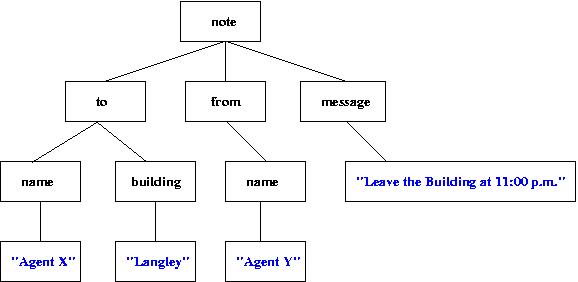
<?xml version="1.0"?> <!DOCTYPE note SYSTEM "DTD/note.DTD"> <note> <to> <name>Agent X</name> <building>Langley, CIA Headquarters</building> </to> <from> <name>Agent Y</name> </from> <message>Leave the building at 11:00 p.m.</message> </note>- XML declaration -- Every raw XML document must start with the first line <?xml version="1.0"?>. This simply declares the version of XML being used.
- Document Type Declaration -- Every XML document must contain a line specifying the document type. In this XML document, we are assuming there is a DTD (Document Type Definition) created located in the local file system with the path DTD/note.DTD.
- Root Element -- In this XML document, the root element is the note element. There is only one root element for each XML document. To obtain the root element of a DOM tree simply call getDocumentElement(), which returns the root element of a DOM tree. This is a very helpful method, found in the org.w3c.dom package.
- Node -- A node is the primary datatype for the entire Document Object Model. There are 12 node types, which are listed in the Java API in the Node Interface in the org.w3c.dom package. Every box in the diagram below is a node.
- Parent -- In this XML document, every node is a parent node with the exception of the text nodes. Namely, the nodes which contain "Agent X", "Langley", "Agent Y", and "Leave the Building at 11:00 p.m.".
- Children -- In this XML document, every node is a child note with the exception of the root element note. Notice that the content of a node (e.g. "Agent X") is a child. The text nodes are colored blue in the diagram below. The best way to interpret parent and child is to draw a diagram of the DOM tree. It then becomes very clear.
- Document -- The Document interface represents the entire XML document. When we say Document with a capital D, that is referring to a DOM tree.
- Well-formed -- An XML document is well-formed if it is syntactically correct.
- Valid -- An XML document is valid if it conforms to a given DTD or schema. A document can be well-formed but not valid. However, a document cannot be valid, but not well-formed.
Visual Tree Representation of a DOM
Useful packages for traversing and modifying a DOM tree
For purposes of simplicity, let's assume that rootElement has been defined to be the root element of this DOM tree. That is, rootElement represents the DOM tree specified by the diagram above. To obtain the value "Agent X", this sequence of calls needs to be made:
- rootElement.getFirstChild().getFirstChild().getFirstChild()
Recursion and DOM trees
An excellent way to gain a strong understanding of the recursion involved with processing an XML document, it is helpful to spend the time to write a DOM serializer. A DOM serializer is simply a process to generate a raw XML document from a DOM tree. So, the number of children must be known at all times and a recursive process must be called to deal with any number of children and any number of parents. Remember that a DOM is really nothing more than a data structure stored in main memory.
Additionally, like mentioned before, there are 12 types of Nodes, and each type is displayed differently. Writing a Serializer won't be an assignment here, but will most likely become a task in the team project later in the semester. The only way to change the contents of an XML document is to first parse the document into a DOM tree, then make changes. However, we would like a new raw XML document to reflect the changes made to the DOM tree. So, we need to write the DOM tree to a file to accomplish this. Our project is going to involve a lot of XML defining the structure of a portfolio, and if the structure needs to be changed then a DOM tree must be created, changes made to that DOM tree, and the DOM is rewritten as a file and stored again. There will be many methods to accomplish this task, and if the methods are written well the first time, it can be reused for any XML document.
Example of XML processing in Java
The following example shows recursive modification... (append to <name>s, add a <department>)
Processing XML with SAX
_____Defining a document type with a DTD
Examples:
~cs378/xml/Contract.dtd,SpecML.dtd- DTD Elements:
<!ELEMENT element-name (element-content)> - Elements with children (sequences):
<!ELEMENT element-name (child-element-name, child-element-name, ..., child-element-name)> - Elements with only character data:
<!ELEMENT element-name (#PCDATA)> - Elements with one or more elements:
<!ELEMENT element-name (child-element+)> - Elements with zero or more child elements:
<!ELEMENT element-name (child-element*)> - Elements with either/or content:
<!ELEMENT element-name (child-element1|child-element2)> - There are many other ways to constrain the contents of an XML document. For a good reference of these options, please visit the following URL: W3 Schools.
A Document Type Definition (DTD) is used to constrain the content of an XML document. For example, if you are trying to model the contents of a music collection you would like a CD to have only one artist and one album name. DTDs allow a developer to specify exactly these types of constraints. A DTD is used to define the legal building blocks of an XML document. A DTD can be declared inline in your XML document or as an external document.
Defining a document type with an XML Schema
_____Processing XML with XSLT
Example: SpecMLToHTML.xsl